Built for Shopify media management & SEO

Reclaim Shopify storage.
Optimize media & SEO.

NexVault scans your Shopify store to find orphaned files, compare duplicates side-by-side, auto-generate AI alt-text, recover failed tasks, and pause/resume background scans—safely keeping your store lightning fast.

AI Alt-Text Visual Duplicate Compare Failed Job Recovery Pause & Resume
Safe Trash + Restore AI-Powered SEO Full Task Controls
Dashboard Overview
Storage health, duplicates, alt-text & tasks.
100% Health
Unused / Orphaned
Auto-detected
Safe Trash
Duplicates
Compare & Master
Visual Compare
Alt-Text SEO
AI Workspace
Auto-Generate
Background Tasks
Pause & Resume
Self-Healing Hub

Complete control over Shopify media & storage

NexVault unifies scanning, AI optimization, visual deduplication, and reliable job management into one seamless experience.

AI Alt-Text Workspace

Audit images missing alt descriptions, edit manually in bulk, or generate concise, SEO-optimized alt text with AI.

Visual Duplicate Compare

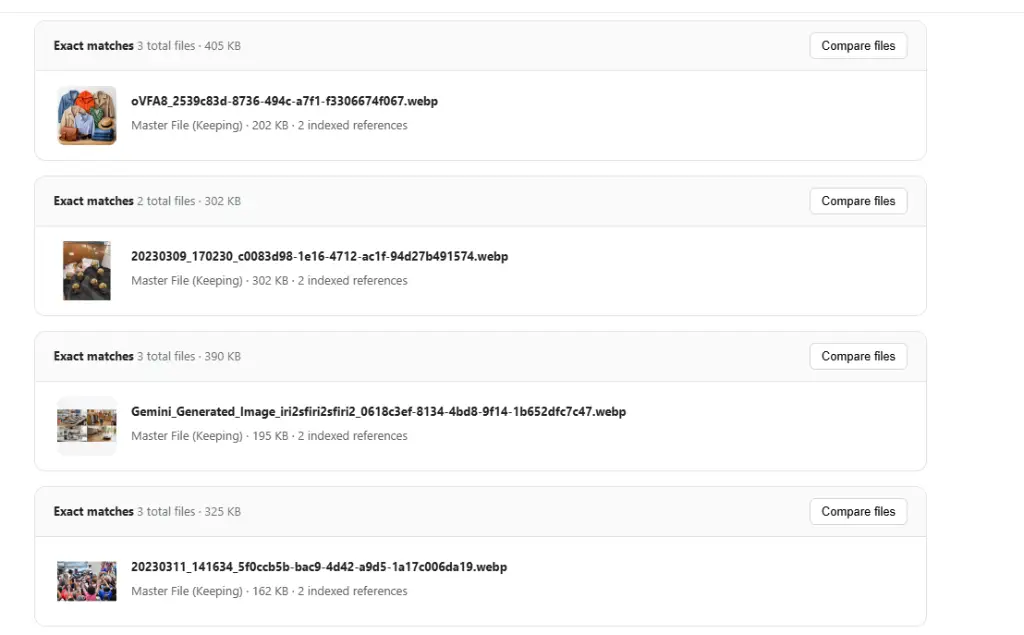
Compare duplicate images side-by-side, inspect linked references, and select your master file before trashing duplicates.

Failed Job Review Hub

Diagnose background issues, refresh indexing, retry compression, and manage failed tasks across 4 dedicated views.

Pause & Resume Tasks

Pause duplicate scans and compression queues during flash sales or heavy store traffic, then resume without losing progress.

Cleanup Orphaned Files

Safely locate unreferenced files and send them to Trash with a reversible restore window before permanent purge.

Upload & Bulk Compression

Compress images on upload or across your entire catalog with WebP conversion, resizing, and quality slider controls.

Major Update Recently Released

Explore the Newest NexVault Features

We've expanded NexVault with powerful tools to improve SEO, eliminate duplicate media safely, recover background tasks, and give you complete control.

New AI Powered Store SEO & Accessibility

AI & Bulk Alt-Text Workspace

Image alt text is critical for search engine rankings and storefront accessibility. NexVault's new Alt-Text Workspace audits your entire catalog to pinpoint images missing descriptions, allowing you to fill them in manually or let AI generate them in seconds.

Complete Audit

Separate images into missing alt text, existing alt text, and those intentionally left blank for decorative purposes.

AI Auto-Generation

Generate context-rich, concise alt text adhering to Shopify's recommended 125-character guideline (max 512).

Bulk Review & Edit

Review 50 images per batch, preview AI suggestions, edit inline if needed, and apply changes in one click.

Safe Replacement

Existing alt text is protected by default. Toggle "Allow replacement" only when you want to overwrite.
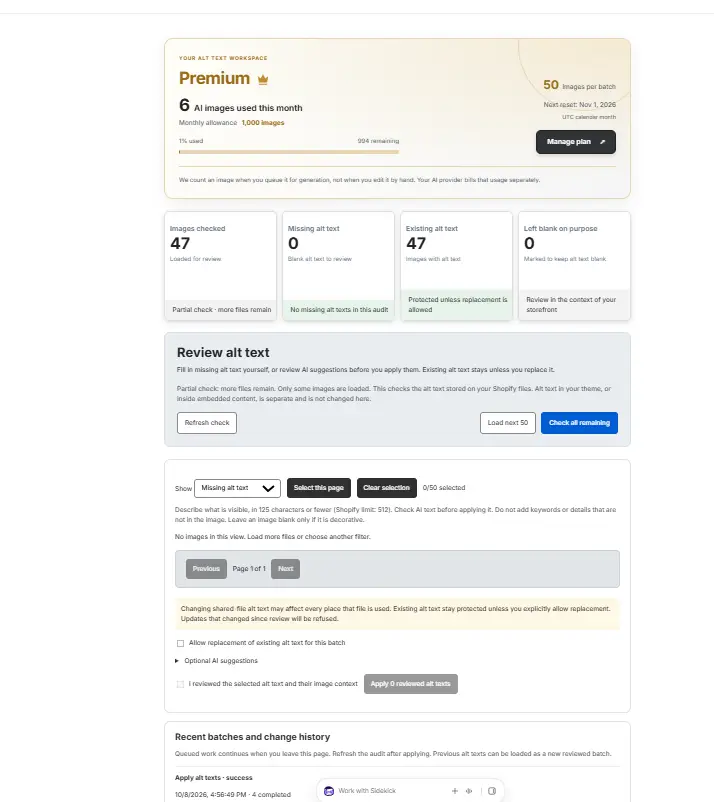
nexvault.app / alt-text-workspace
NexVault Alt-Text Workspace screenshot showing audit metrics, AI monthly allowance, and bulk review
Enhanced Smart Deduplication

Visual File Compare & Master Selection

Don't guess which duplicate image to trash. NexVault now features an interactive side-by-side File Compare view that lets you inspect every duplicate version, examine resolution and reference counts, and hand-pick the master copy to keep.

  • Side-by-Side Visual Comparison: View thumbnail cards of all matched files next to each other with exact dimensions (e.g. 1280 × 698) and file sizes.
  • Smart Metadata Tags: Instantly spot files labeled Highest resolution, Compressed, and Most used.
  • Designate Master File: Click "Set as master" on your preferred file. NexVault marks it as Master File (Keeping) and respects this choice in future scans.
  • Reference Protection: View detected product and variant references across copies so redundant files can be trashed without breaking storefront links.
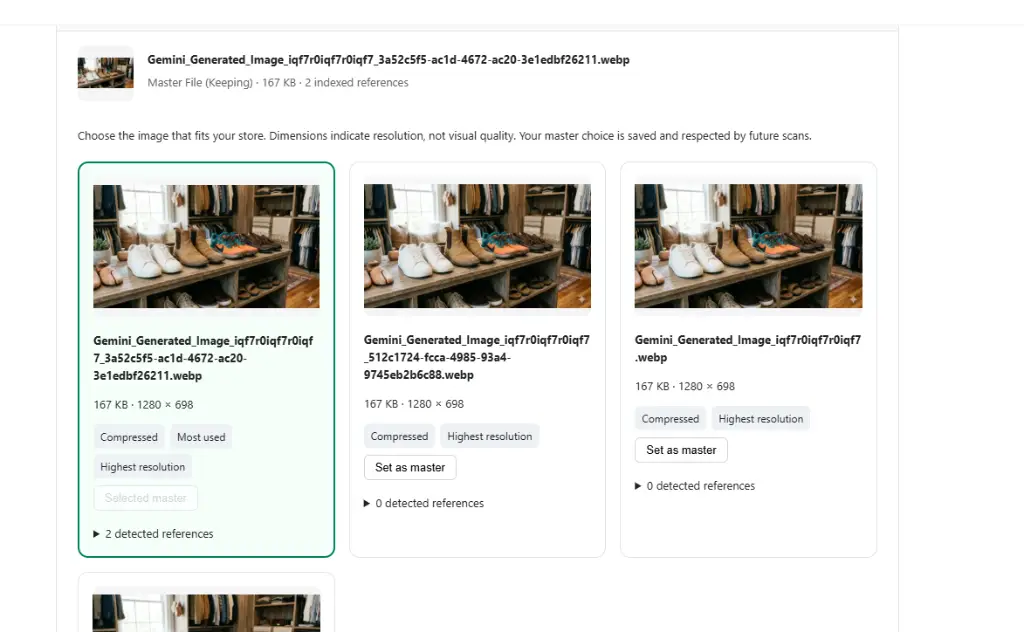
duplicate-scan / compare-files-view
NexVault side-by-side duplicate file comparison view with master file selection
duplicate-scan / exact-matches-group
NexVault exact matches list with Compare Files action buttons
New Self-Healing Infrastructure

Failed Job Review & Recovery Hub

Background operations like bulk compressions, webhook syncs, and deletions should never fail silently. NexVault's "Review • Recover • Resume" page provides full transparency into background tasks, diagnostic reasons, and one-click remediation tools.

4 Focused Views

Switch easily between File problems, Failed/Cancelled jobs, Webhook retries, and Active tasks.

Root-Cause Clarity

Understand reasons immediately (e.g. "Deletion was blocked because this image is still used" or "Missing fileGid").

Actionable Controls

Check Shopify status, refresh indexing, retry compression, keep current files, or safely delete problematic items in bulk.

Audit History

Every recovery action records its original failure reason and result in your store's persistent Recovery History.
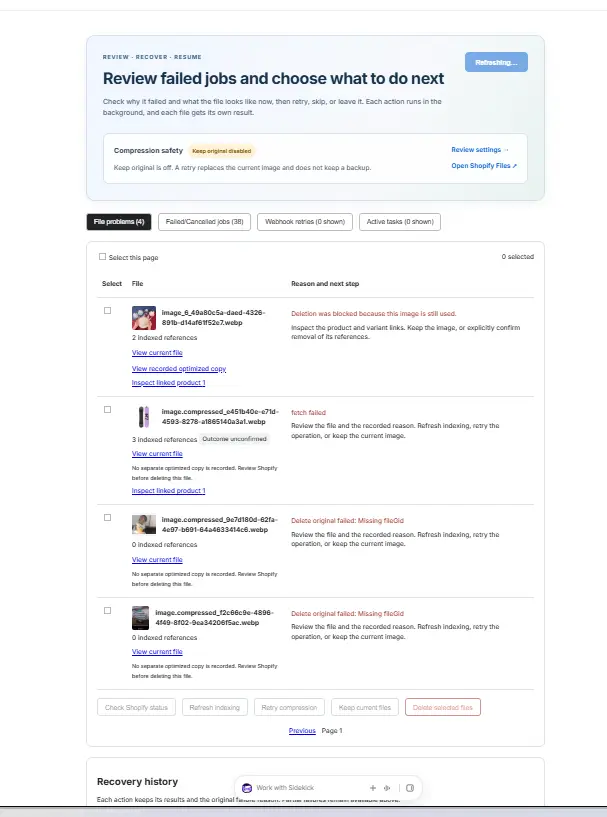
nexvault.app / failed-job-review
NexVault Failed Job Review dashboard with diagnostic reasons and recovery buttons
New Non-Disruptive Operations

Pause & Resume Background Tasks on Demand

Managing large catalogs with tens of thousands of images shouldn't slow down your store during peak traffic hours or product launches. With NexVault's new Pause & Resume functionality, you are in total control.

Instant One-Click Pause

Halt duplicate scans or bulk compression queues instantly when you need bandwidth.

Zero Lost Progress

Resume from the exact file index without re-scanning or repeating processed assets.

Peak Sale Protection

Safeguard Shopify API quotas during flash sales, BFCM events, and catalog updates.

Duplicate Scan #1042 Paused
3,400 / 5,000 files 68%

Flexible plans for stores of all sizes

Choose the plan that fits your catalog volume. All plans include safe trash protection and regular scanner updates.

Free

Essential tools to audit and test

$0/mo
  • 25 image optimizations/mo
  • File explorer & sorting
  • Orphaned file detection
  • Missing alt-text audit count
  • Safe Trash + restore window
Install Free

Pro

Enhanced control for growing stores

$3.99/mo
  • 300 image optimizations/mo
  • Everything in Free
  • Exact-match duplicate scan
  • Manual bulk alt-text editor
  • Pause & Resume background tasks
  • Email notifications
Get Pro

Frequently Asked Questions

Everything you need to know about NexVault's new features and media management.

The Alt-Text Workspace scans your Shopify media to classify images into missing alt text, existing alt text, and decorative blanks. You can write custom alt text or click to generate AI suggestions in bulk. NexVault lets you preview each text, edit inline if needed, respects character limits (recommended ≤ 125 characters, maximum 512), and keeps existing alt text protected unless you intentionally allow replacement.

Rather than blindly deleting duplicates by name, NexVault displays matching files side-by-side with exact dimensions, file sizes, and detected product/variant references. You can click "Set as master" to designate which file to keep. NexVault saves your master choice for all future scans and ensures files still in active use aren't accidentally removed.

Navigate to the Failed Job Review page. NexVault categorizes issues into File problems, Failed/Cancelled jobs, Webhook retries, and Active tasks. You can view the exact failure reason (e.g. active variant link or API timeout), refresh Shopify indexing, retry compression, keep current files, or safely delete them.

Yes! You can pause duplicate scans, compression jobs, or catalog audits whenever your store experiences heavy traffic (like flash sales or Black Friday). When ready, click Resume—the job continues from the exact file checkpoint without starting from scratch.